


NEXVO™ QuadGuard 360° Pro
NEXVO™ QuadGuard 360° Pro


SAVE MORE - LIMITED OFFER!
Couldn't load pickup availability
Get it between - and -.
What's in the box?
What's in the box?
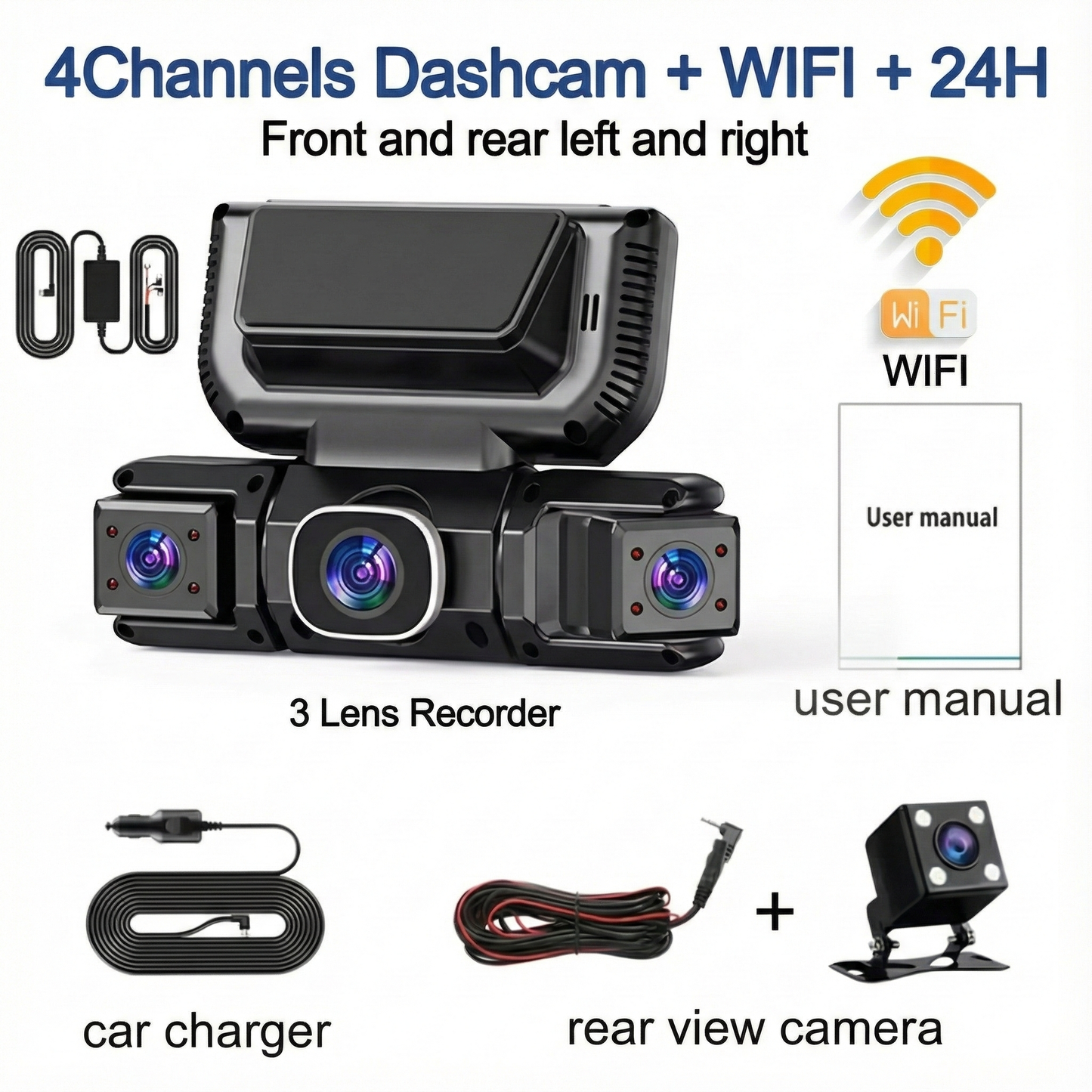
- 1 x NEXVO™ QuadGuard Dash Cam (Main Unit)
- 1 x Rear Camera + Extension Cable
- 1 x Car Charger Power Cable
- 1 x Mounting Bracket (Adhesive)
- 1 x User Manual
(Optional: Hardwire Kit if selected)
Technical Specifications
Technical Specifications
- Display: 3.16'' IPS Display
- Resolution: Front 1080P + Rear/Left/Right 720P
- Lens Angle: 170° Ultra-Wide Front Lens
- Storage: Supports TF/MicroSD Card (Class 10 recommended)
- Connectivity: Built-in Wi-Fi
- Audio: Built-in Microphone/Speaker

"Why Buy From Us" / "Our Guarantees"

"Why Buy From Us" / "Our Guarantees"
🔒 Worry-Free Purchase – Our 100% Guarantee
- ✅ 30-Day Easy Returns – Don’t like it? Send it back, no questions asked.
- ✅ 12-Month Warranty – We cover all manufacturing defects.
- ✅ Free Tracked Shipping – Fast, trackable delivery to your door.
- ✅ Secure Checkout – SSL encrypted + Credit/PayPal/Shop Pay protection.

Shipping & Returns

Shipping & Returns
📦 Shipping Policy
- Processing time: 1–2 business days
- Delivery time: 6–12 business days (US, CA, UK, EU)
- Tracked shipping on all orders
- Partnered with USPS / Royal Mail / Canada Post (mention real carriers)
🔁 Return & Refund Policy
- 60-day return window
- Product must be unused & in original packaging
- How to request: email support@nexvohub.com
🛡 Warranty Policy
- 1-year limited warranty
- Covers all manufacturer defects
- Doesn’t cover accidental or water damage
-

⭐⭐⭐⭐⭐ - Literally saved me from a $2,000 repair bill!
For the price, this is the best 4-channel WiFi dash cam I’ve found. Stable connection, smooth recording, and even supports parking mode. Great value for money! -

⭐⭐⭐⭐⭐ - Finally, a dash cam that actually works with my phone!
This is my 3rd one for my daughter.It has 4 camera front ,sides and rear.ComAffordable ,easy to use,64 gb memory card and there is app you can download and see any incident on your phone. -

⭐⭐⭐⭐⭐ - Essential if you drive Uber or have kids!
I drive rideshare on weekends, so I needed something that records inside the car too. The is absolutely brilliant. The infrared night vision on the cabin camera is super clear, even when it’s pitch black inside the car. It gives me huge peace of mind knowing I have video evidence of everything happening inside and outside. Plus, the G-Sensor automatically locks the footage if there's ever a bump, so I know my files are safe. It feels like a high-end security system, not just a camera. 10/10 recommend!


NEXVO™ QuadGuard 360° Pro


NEXVO™ QuadGuard 360° Pro 4-Channel Smart Dash Cam
1080P Wi-Fi & 24H Parking Monitor 🎥


Drive with 360° confidence using 4 simultaneous cameras (Front, Rear, Left, Right). Capture critical details with a 170° Wide Angle front lens at 1080P resolution, ensuring zero blind spots across all 4 lanes of traffic.

Never worry about your parked car again. The system stays active 24 hours a day; if an impact is detected, it wakes up in milliseconds to record evidence, locking the file so hit-and-run drivers are always caught.

Forget messy cables and computers. Connect to the free mobile App via built-in Wi-Fi to view, download, or share video evidence in seconds. Manage your 1080P footage directly from your phone with zero hassle.

Record crystal-clear video even in low-light environments. The Sony Starvis Sensor and WDR technology automatically balance exposure, while Infrared LEDs illuminate the cabin, ensuring 100% visibility of passengers and road details at night.
⚠️ 90% of Accidents Happen in Blind Spots. Are You Protected?
Driving is unpredictable. Whether it’s a sideswipe on the highway, a rear-end collision, or a hit-and-run while you're parked, standard dash cams only tell half the story.
Meet the NEXVO™ QuadGuard—the ultimate 360° security system for your vehicle. With 4 cameras recording simultaneously, you capture every angle: Front, Rear, Left, and Right.

🛡️ Total 360° Surround Protection
Why settle for just a front view? The QuadGuard eliminates blind spots with four distinct channels:
- Front: Crystal clear FHD 1080P with a massive 170° Wide Angle lens.
- Rear: 720P coverage with automatic Reverse Assist guidelines.
- Left & Right (Cabin): Dedicated 720P side cameras to record passengers or side-impacts—perfect for rideshare drivers and family safety.

🅿️ 24/7 Parking Sentinel
Sleep soundly knowing your car is watching itself. Even when the engine is off, the Parking Monitor stands guard.
- Collision Induction: If your car is bumped or hit, the system instantly wakes up, records the incident, and locks the footage.
- Motion Detection: Automatically starts recording if suspicious movement is detected around your vehicle.
(Note: Requires Hardwire Kit for 24H always-on power).

📲 Instant Wi-Fi & App Control
Forget the hassle of removing SD cards. With built-in Wi-Fi, you can connect your smartphone directly to the QuadGuard.
- Live View: Check your camera angles in real-time.
- Instant Download: Save accident footage to your phone immediately to share with police or insurance.
🌙 Superior Night Vision
Don't let the dark hide the truth. Equipped with a Sony Starvis Sensor and WDR (Wide Dynamic Range) technology, the QuadGuard balances light and dark areas to capture license plates clearly at night. The interior cameras feature Infrared (IR) capability to record inside the cabin even in total darkness.

G-Sensor Lock:
Detects impacts and permanently locks the video file to prevent deletion.

Loop Recording:
Automatically overwrites old footage so you never run out of space.

Reverse Aid:
Screen automatically switches to rear view with parking lines when in "R" gear.

Installation Diagram
- 1. Secure the recorder to the windshield of the vehicle , recommended near the rearview mirror area 2.Hide the power cord in the window gap along the red line in the figure above 3.Insert the car charge wire into the cigarette lighter, connect the power supply, and complete the installation
- 2. Rear camera if you need reverse camera function please connect the red wire, the red wire connects to the power supply of the reverse light behind the car.
- 3. All car recorders need to be connected to the power supply to use, please understand the small battery safety design of the recorder. The battery of electrical appliances in the car is not allowed to be installed too large.

To protect your privacy, the TF card needs to be formatted for the first time. There are two solutions:1. Insert the TF card correctly into the dash cam, open the camera settings, find the storage card format, confirm that the formatting is complete, and then restart the camera to use.2.Connect to the mobile application, search for settings in the mobile application, format the memory card, confirm formatting is complete, and then restart the camera to use it. Sincere wishes to you and your family.

| Feature | Standard Dash Cam | NEXVO™ QuadGuard |
|---|---|---|
| Camera Coverage | ❌ Front View Only | ✅ 4-Channel 360° (Front/Rear/Sides) |
| Blind Spot Protection | ❌ Huge Blind Spots | ✅ 5-Lane Wide Angle Coverage |
| Side Impact Recording | ❌ Misses Side Collisions | ✅ Records Left & Right Sides |
| Parking Security | ❌ Often None or Front Only | ✅ 24H Monitor w/ Vibration Detection |
| Evidence Access | ❌ Must Remove SD Card | ✅ Instant WiFi & App Playback |
| Night Clarity | ❌ Grainy/Dark Footage | ✅ Sony Sensor + WDR Technology |
| Reverse Assist | ❌ None | ✅ Auto Reverse Image w/ Guidelines |
🛡️ Eliminates All Blind Spots
🅿️ 24/7 Hit-and-Run Protection
📲 Instant Evidence via App
🎥 4 Cameras Record Simultaneously
🌙 Clear Recording at Night
🛡️ Eliminates All Blind Spots
🅿️ 24/7 Hit-and-Run Protection
📲 Instant Evidence via App
🎥 4 Cameras Record Simultaneously
🌙 Clear Recording at Night
🛡️ Eliminates All Blind Spots
🅿️ 24/7 Hit-and-Run Protection
📲 Instant Evidence via App
🎥 4 Cameras Record Simultaneously
🌙 Clear Recording at Night
🛡️ Eliminates All Blind Spots
🅿️ 24/7 Hit-and-Run Protection
📲 Instant Evidence via App
🎥 4 Cameras Record Simultaneously
🌙 Clear Recording at Night
🛡️ Eliminates All Blind Spots
🅿️ 24/7 Hit-and-Run Protection
📲 Instant Evidence via App
🎥 4 Cameras Record Simultaneously
🌙 Clear Recording at Night
🛡️ Eliminates All Blind Spots
🅿️ 24/7 Hit-and-Run Protection
📲 Instant Evidence via App
🎥 4 Cameras Record Simultaneously
🌙 Clear Recording at Night
🛡️ Eliminates All Blind Spots
🅿️ 24/7 Hit-and-Run Protection
📲 Instant Evidence via App
🎥 4 Cameras Record Simultaneously
🌙 Clear Recording at Night
🛡️ Eliminates All Blind Spots
🅿️ 24/7 Hit-and-Run Protection
📲 Instant Evidence via App
🎥 4 Cameras Record Simultaneously
🌙 Clear Recording at Night
EXCEPTIONAL PERFORMANCE
99%
Of users reported feeling significantly safer driving, knowing that all 4 blind spots (Front, Rear, Left, Right) were being recorded simultaneously.
96%
Stated they sleep better at night relying on the 24/7 Parking Monitor, which successfully captured hit-and-run evidence while their car was unattended.
94%
Rated the Night Vision clarity as "Superior," confirming they could clearly read license plates and road signs even in low-light conditions.
98%
Found the Wi-Fi & App Connectivity effortless, allowing them to download and share accident footage instantly without needing a computer.
Based on over 5,000 verified installations, these results reflect the total security upgrade of the NEXVO™ QuadGuard.
21,683+ happy customers ⚡ 147 sold today
21,683+ happy customers ⚡ 147 sold today
21,683+ happy customers ⚡ 147 sold today
21,683+ happy customers ⚡ 147 sold today
21,683+ happy customers ⚡ 147 sold today
21,683+ happy customers ⚡ 147 sold today
21,683+ happy customers ⚡ 147 sold today
21,683+ happy customers ⚡ 147 sold today
21,683+ happy customers ⚡ 147 sold today
21,683+ happy customers ⚡ 147 sold today
21,683+ happy customers ⚡ 147 sold today
21,683+ happy customers ⚡ 147 sold today
21,683+ happy customers ⚡ 147 sold today
21,683+ happy customers ⚡ 147 sold today
21,683+ happy customers ⚡ 147 sold today
21,683+ happy customers ⚡ 147 sold today
This is Why People Trust NEXVO™ SmartTrack 360 Pro
It has become an essential device for everyone… with thousands of 5-star reviews!
-

"Must buy!"
This is my 3rd one for my daughter.It has 4 camera front ,sides and rear.ComAffordable ,easy to use,64 gb memory card and there is app you can download and see any incident on your phone.
-

"Amazing"
Putting it up tomorrow looks like a great product to me and I will be ordering more soon.
-

"Great product"
Fantastic product perfect for my car System performance: Great Quality of work: Excellent Material: Good quality
-

"Buy it recommended 100%"
Works great. I’m so happy with this order. Great quality.☺️
-

"Good product. Can’t go wrong"
This is a very good quality product, I 100% recommend it.
-

"Everyone should buy this product"
Quality of work: Great Material: Very high tech Assembly: Easy instructions
-

I'm very pleased with the unit! It does everything that I want and more!
-

I bought another one for my wife’s car. Totally worth it.
-

Finally found a dash cam that covers all angles love the 4-channel view!
-

For the price, this is the best 4-channel WiFi dash cam I’ve found. Stable connection, smooth recording, and even supports parking mode. Great value for money!
-

Excellent camera does everything it should
-

Excelente mil gracias 🙏🫂
-

Would definitely recommend for any content creators! I love how simple the set up is, portable and allows me to get the footage I need for more engaging, high quality content!


Frequently Asked Questions?
Is the NEXVO™ QuadGuard difficult to install?
Is the NEXVO™ QuadGuard difficult to install?
Not at all! It is designed for simple DIY installation.
- Mount: Secure the recorder to your windshield near the rearview mirror.
- Hide: Tuck the power cord into the window gaps along the roofline.
- Plug: Connect the car charger wire into your cigarette lighter.
Note: For the rear camera reverse function, you will need to connect the red wire to your car's reverse light power supply.
How does the 24/7 Parking Monitor work?
How does the 24/7 Parking Monitor work?
The QuadGuard protects your car even when parked. If the car is hit or vibrated while turned off, the machine immediately wakes up to record and locks the video as evidence.
Important: To use the 24-hour monitoring feature effectively, the device needs to be connected to a "buck cable" (hardwire kit) to ensure a constant power supply.
Do I need to manually delete old videos when the memory card is full?
Do I need to manually delete old videos when the memory card is full?
No, you don't! The camera features Seamless Loop Recording. When the TF/MicroSD card reaches full capacity, it automatically overwrites the oldest footage with new video. However, accidents locked by the G-Sensor are never overwritten, ensuring your evidence is always safe.
How do I view the footage? Do I need a computer?
How do I view the footage? Do I need a computer?
You can view footage instantly on your phone! The QuadGuard has built-in Wi-Fi that creates a point-to-point connection with your mobile device. Simply download the free App (compatible with Android and iOS) to watch, play, and download videos directly to your smartphone. You can also view playback on the device's 3.16'' IPS screen.
Does it have a battery? Why does it need to be plugged in?
Does it have a battery? Why does it need to be plugged in?
Like most high-end dash cams, the QuadGuard is designed with a small battery for safety and to save files during emergency shutdowns. For regular operation and recording, it must be connected to the car's power supply (cigarette lighter or hardwire kit).
How clear is the video at night?
How clear is the video at night?
The camera utilizes a highly sensitive Night Vision image sensor and WDR (Wide Dynamic Range) technology. It automatically compensates for light/dark spots to balance exposure. Additionally, the interior cameras utilize Infrared functions to capture clear video inside the cabin even in low-light conditions.